.svg)


.png)
Power BI sits where the data supply chain meets the business. Yet for most enterprise data teams, it remains a blind spot. When a report breaks, the investigation starts from scratch: manually tracing backward through semantic models, dataflows, pipelines, and source tables across platforms that don't talk to each other. When a source schema changes, no one knows which downstream dashboards are affected until a business user notices something looks wrong. When data quality degrades upstream, its impact on BI assets is invisible until trust has already eroded.
The problems are well understood:
- No cross-platform lineage. Power BI's native lineage stops at the workspace boundary. The connection to upstream cloud warehouses, lakehouses, and pipelines is opaque.
- Change impact is invisible. A renamed column or deprecated field can silently break dozens of reports. There's no automated way to know what's affected before users do.
- Quality signals don't travel downstream. Data quality scores and freshness checks generated at the source layer rarely make it to the BI layer in any meaningful, actionable form.
- Incident response is reactive. Without end-to-end visibility, every incident requires manual investigation. There's no single view of what broke, what it affects, and where to start.
ADOC 26.3.0 addresses this directly with the General Availability of the Power BI Crawler and Lineage capability — moving from Preview to production-ready, with validated connector coverage, column-level traceability, and enterprise-grade reliability across the full Power BI artifact hierarchy.
What's Now GA
End-to-End Lineage Across the Full Power BI Hierarchy
ADOC now maps the complete data journey — from source tables in your cloud warehouse to the tiles on an executive dashboard. Lineage validation spans every layer of the Power BI asset model: Workspace → Dataflow (Gen1) → Semantic Model → Report → Dashboard → Tiles. This gives data teams a single, authoritative view of how data flows into and across their entire BI estate.
Validated Connector Coverage
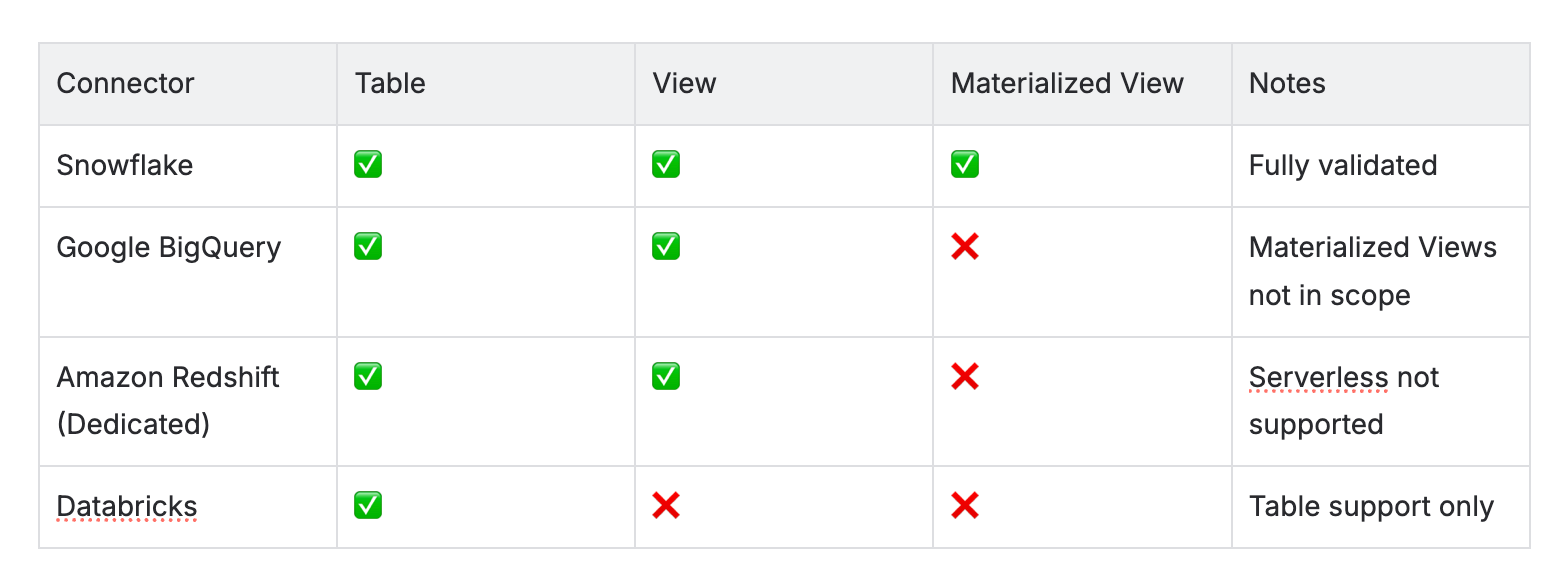
GA lineage is fully validated across four major connectors:
Column-Level Lineage
For Snowflake, BigQuery, and Redshift, lineage now traces down to individual columns — mapping Semantic Model columns and Dataflow columns back to their source table columns. Teams can toggle Sub-Level Lineage to see column names, data types, and data quality scores inline within the lineage graph.
Impact Analysis — Propagated in Real Time
When an upstream dataset fails or degrades, the lineage view immediately highlights affected downstream Power BI assets with visual indicators. Data teams can see, at a glance, which dashboards and reports are in the blast radius — enabling faster prioritization and resolution before business users are impacted.
Quality Score Propagation
Data quality scores now travel from source tables through Semantic Models to Reports and Dashboards, giving BI assets the same observability context that exists in the pipeline layer.
Enterprise-Scale Controls
GA validation also confirms support for multi-workspace lineage scenarios, regex-based include/exclude filtering for dashboards and reports, schema-level filtering, case-sensitivity handling, and configurable crawler schedules — making the integration operationally ready for large, complex Power BI estates.
Upgrade Note: Data Plane v4.6.0 is required to use the Power BI connector. Existing Power BI data sources should be re-crawled after upgrading to ensure full lineage fidelity.